

Virtual Bookkeeping Services in the USA: Accurate, Affordable & Stress-Free in 2026
The demand for virtual bookkeeping has surged across the United States as businesses move toward digital financial management and cloud-based operations. With rising overhead costs and the need for instant, accurate financial insights, U.S. small businesses increasingly prefer remote bookkeeping over traditional in-house setups. Virtual bookkeeping offers significant cost savings, improved accuracy through automation, seamless integrations with accounting software, and 24/7 access to financial data from anywhere.
As this shift accelerates, StayAccounted.com has positioned itself as a trusted virtual bookkeeping partner for U.S. businesses—delivering reliable, affordable, and tax-ready bookkeeping services designed specifically for the needs of American entrepreneurs.

Things you should Look For in Rental Property Bookkeeping Software
Virtual bookkeeping services refer to professional bookkeeping performed remotely using cloud-based accounting software. Instead of hiring an in-house bookkeeper, businesses work with certified bookkeepers online who manage their financial records, transactions, reconciliations, and reports from anywhere in the world.
How Virtual Bookkeeping Works
Virtual bookkeeping is powered by secure, modern technology:
Cloud Accounting Software: Platforms like QuickBooks Online, Xero, and Wave store financial data safely in the cloud, allowing both the business owner and the bookkeeper to work in real time.
Remote Bookkeepers: Certified professionals handle daily, weekly, and monthly bookkeeping tasks without needing to be physically in the office.
Secure Data Access: Encrypted logins, permission controls, and cloud backups ensure all financial information remains confidential and protected.
Why U.S. Businesses Are Moving Away From In-House Bookkeeping
More U.S. businesses are switching to virtual bookkeeping because it solves the biggest challenges of traditional bookkeeping:
Lower Costs: No payroll taxes, benefits, office space, or full-time salary required.
Higher Accuracy: Cloud tools reduce human error and automate repetitive tasks.
24/7 Access: Business owners can check their finances anytime, from any device.
Scalability: Easily increase or decrease bookkeeping support as the business grows.
Better Compliance: Virtual bookkeepers stay updated with U.S. tax rules and accounting standards.
By combining technology, efficiency, and expert support, virtual bookkeeping has become the preferred choice for small and mid-sized U.S. businesses looking to streamline their financial operations.
.
What Are Virtual Bookkeeping Services?

Virtual bookkeeping services refer to professional bookkeeping performed remotely using cloud-based accounting software. Instead of hiring an in-house bookkeeper, businesses work with certified bookkeepers online who manage their financial records, transactions, reconciliations, and reports from anywhere in the world.
How Virtual Bookkeeping Works
Virtual bookkeeping is powered by secure, modern technology:
Cloud Accounting Software: Platforms like QuickBooks Online, Xero, and Wave store financial data safely in the cloud, allowing both the business owner and the bookkeeper to work in real time.
Remote Bookkeepers: Certified professionals handle daily, weekly, and monthly bookkeeping tasks without needing to be physically in the office.
Secure Data Access: Encrypted logins, permission controls, and cloud backups ensure all financial information remains confidential and protected.
Why U.S. Businesses Are Moving Away From In-House Bookkeeping
More U.S. businesses are switching to virtual bookkeeping because it solves the biggest challenges of traditional bookkeeping:
Lower Costs: No payroll taxes, benefits, office space, or full-time salary required.
Higher Accuracy: Cloud tools reduce human error and automate repetitive tasks.
24/7 Access: Business owners can check their finances anytime, from any device.
Scalability: Easily increase or decrease bookkeeping support as the business grows.
Better Compliance: Virtual bookkeepers stay updated with U.S. tax rules and accounting standards.
By combining technology, efficiency, and expert support, virtual bookkeeping has become the preferred choice for small and mid-sized U.S. businesses looking to streamline their financial operations.

Secure Access to Your Accounting Software
Security and confidentiality are essential when it comes to financial data. With virtual bookkeeping services, U.S. businesses maintain full control over their accounting systems while granting secure, limited access to their virtual bookkeepers.
StayAccounted.com uses trusted, cloud-based accounting platforms such as QuickBooks Online, Xero, and Wave, which are built with advanced security protocols to protect sensitive financial information.
How Secure Access Works
Role-Based Permissions: You control exactly what level of access is granted—view-only, editing, or administrative—ensuring transparency and safety at all times.
Encrypted Connections: All data is transmitted using bank-level encryption, protecting your information from unauthorized access.
Two-Factor Authentication (2FA): Additional verification layers reduce the risk of account breaches.
No Sharing of Login Credentials: Secure invitations and user access eliminate the need to share passwords.
Automatic Cloud Backups: Your financial data is continuously backed up, preventing data loss.
Why This Matters for U.S. Businesses
Keeps your financial data compliant with U.S. security and privacy standards
Allows real-time collaboration without sacrificing control
Ensures peace of mind when working with a remote bookkeeping team
Enables seamless communication between your bookkeeper and CPA during tax season
Is virtual bookkeeping secure?
Yes — virtual bookkeeping is highly secure when handled by a professional provider using modern cloud-based systems.
Reputable virtual bookkeeping services use the same (and often stronger) security measures as traditional in-house accounting, including:
Bank-level encryption to protect your financial data during transmission and storage
Cloud accounting platforms like QuickBooks Online and Xero, which are SOC-compliant and continuously monitored
Role-based user access, so you control exactly what your bookkeeper can see and edit
Two-factor authentication (2FA) to prevent unauthorized logins
No password sharing, using secure invitations instead
Automatic backups, ensuring your data is never lost
For U.S. businesses, virtual bookkeeping is often more secure than in-house bookkeeping, as cloud platforms mitigate risks associated with lost files, outdated software, or unsecured local devices.
Buildium – All-in-One Property Management Accounting
Buildium is a full-featured property management platform that includes powerful bookkeeping tools.
- Overview: A cloud-based solution designed specifically for property management. Buildium centralizes rental accounting, tenant management, maintenance requests, and more, so you can handle all aspects of your rentals in one place build. It automates rent tracking, late fees, and even e-filing of 1099 forms for tax time at buildium.com.
- User-Friendliness: Despite its mass features, Buildium’s accounting interface is noted for being intuitive and user-friendly, making tasks like bank reconciliation “as easy as it gets”. The system is normaly easy to navigate and includes helpful reports, though there can be a learning curve simply due to the breadth of what it can do.
- Pricing: Starts around $58/month for the Essential plan. (pricing scales with the number of units managed). It’s not the cheapest option, but every plan includes full accounting features by default. Buildium offers a free trial, and higher tiers (Growth, Premium) unlock advanced tools as your business grows. (Example: Many growing property management companies find the ~$183/mo Growth plan worthwhile for added insights.)
- Ideal for: Property managers and landlords with larger portfolios who require a comprehensive and professional system. If you have dozens of units or plan to scale up, Buildium provides real-time reporting and integrated workflows to keep everything organized. Smaller landlords might find it overkill due to cost, but for a busy rental business, Buildium can save a tons of time by assembling management and bookkeeping in one platform.
DoorLoop – Easy-to-Use Rental Management with Accounting
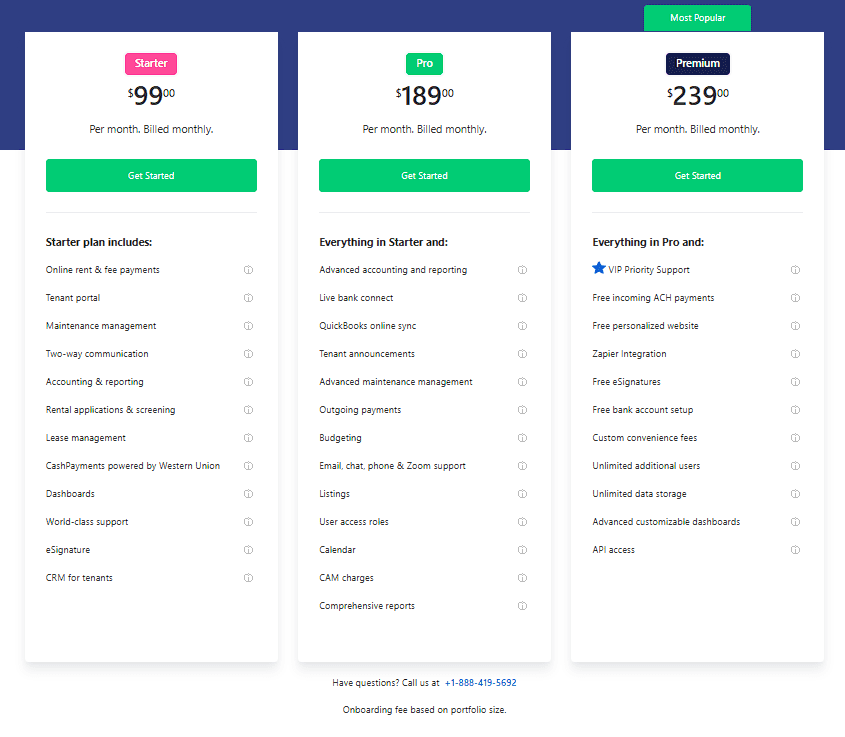
- Overview: DoorLoop is an all-in-one property management software that includes built-in bookkeeping (charts of accounts, financial reports, etc.) It handles tenant screening, lease management, online rent collection, maintenance tracking, and more from a single. Think of it as a modern alternative to Buildium, geared towards simplicity and speed.
- User-Friendliness: DoorLoop prides itself on being extremely easy to use and quick to learn – they openly critique competitors for being complex, aiming to “eliminate the need for long training… by offering the easiest to use platform.” The interface is clean and designed so that even independent landlords can navigate it without feeling overwhelmed. Plus, they have strong support (chat, email, and even phone support on higher plans) to help new users
- Pricing: Flexible, starting at $69/month (covers up to 20 units). Essentially, $69 is the base for 20 or fewer units, and additional units cost about $3 each. There’s no long-term contract – pay monthly and cancel . DoorLoop often runs promotions (e.g., discounts for annual ), making it competitively priced. Considering it bundles accounting + property management, many find it a good value compared to juggling multiple tools.
- Ideal For: Independent landlords and increasing property managers who want all-in-one functionality without a steep learning curve. If you have a handful up to a few hundred units and want to streamline everything (from bookkeeping to tenant communication) in one app, DoorLoop is a great choice. Its simple UI is inviting for non-accountants, and it scales with you (they even cater to large portfolios with custom plans if needed). Overall, DoorLoop strikes a nice balance between power and functionality for rental businesses.
QuickBooks Online – Trusted Accounting Software (General Purpose)
- Overview: Intuit’s QuickBooks Online (QBO) is one of the most widely used accounting software across many industries – including by landlords and real estate investors. It’s not rental-specific, but it’s a powerful double-entry accounting system where you can log rent income, property expenses, and run detailed financial reports. several landlords use QuickBooks to track multiple properties by class or tag, generate profit/loss statements, and simplify tax prep. It also offers features like invoicing, bill pay, receipt scanning, and payroll (if you have employees)
- User-Friendliness: QuickBooks is feature-rich, which can mean a steeper learning curve for newcomers to accountingigms.com. The interface is professional and comprehensive – great if you’re familiar with bookkeeping basics, but possibly overwhelming if you’re not. On the bright side, because QBO is so popular, there are many tutorials, and many accountants are already fluent in it. Plus, QBO allows you to easily share your books with an accountant or tax preparer, which can save headaches come tax season.
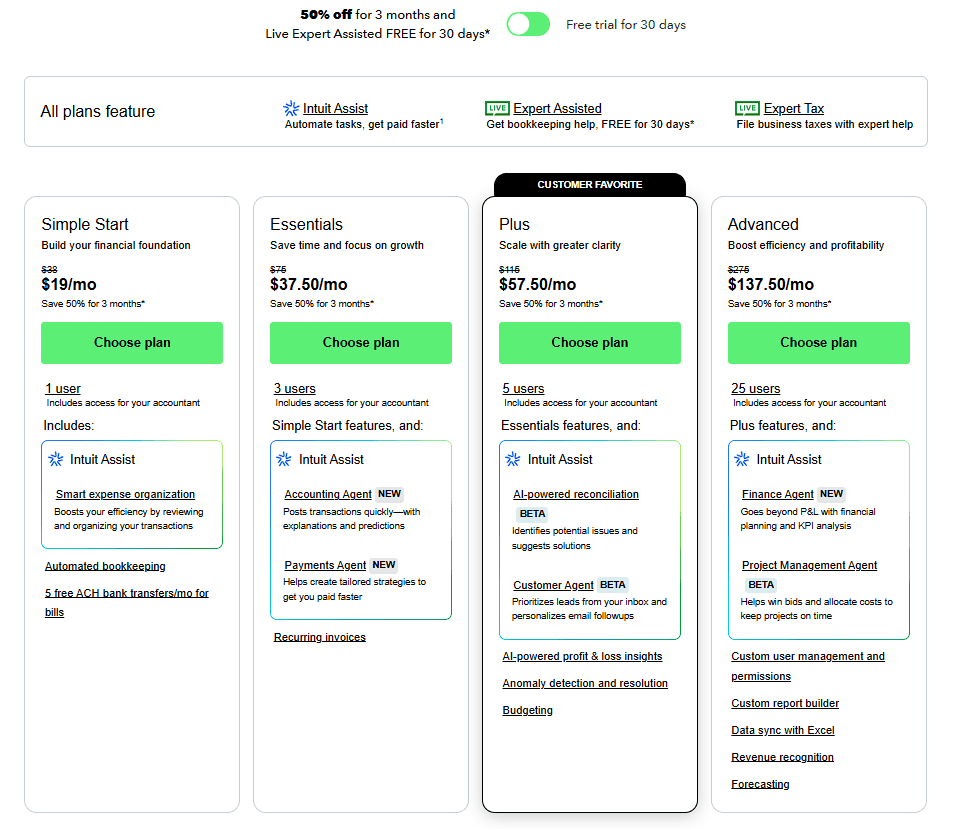
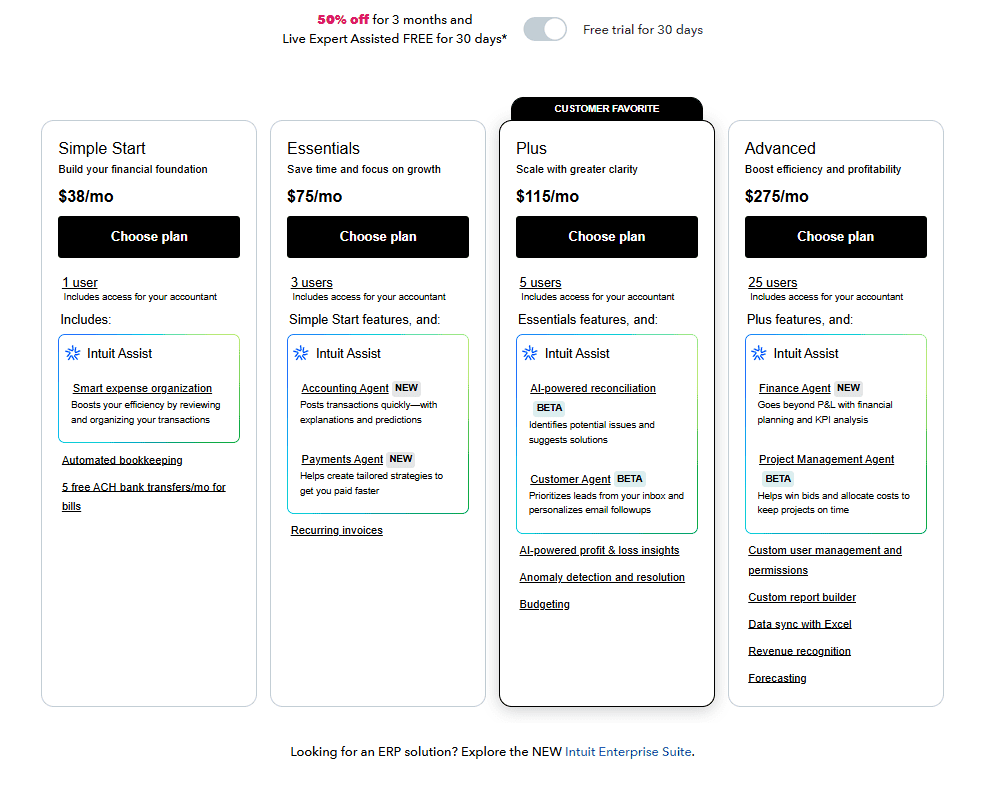
- Pricing: Mid-range to high, depending on plan. QuickBooks Online has four main tiers: Simple Start, Essentials, Plus, and Advanced. As of 2025, the base Simple Start is around $38 per month (often discounted to ~$19 for the first few months)nerdwallet.com. Higher plans cost more – roughly $75, $115, and $275 per month for the top tier, with each level adding extra users and features like bill management or inventory tracking. It’s a significant cost if you only have one or two rentals, but if you also run other business activities or need robust reports, many find the investment worth it. (Note: there is also QuickBooks Self-Employed (now called “QuickBooks Solopreneur”) at ~$20/month for very basic needs, but it’s less flexible for property accounting.)
- Ideal For: Landlords who want full-fledged accounting or already work with accountants. If you have many properties, especially in different entities, and need to generate polished financial statements, QuickBooks is an industry-standard. It’s also great if you plan to grow your business or take out loans – your CPA and lenders will be familiar with QBO reports. However, if you’re looking for rental-specific tools (tenant portals, etc.), QBO by itself won’t provide that – you’d use it purely for bookkeeping and perhaps pair it with a property management tool. In summary, QuickBooks is reliable and widely supported, but it may be more than necessary for a casual landlord due to cost and complexity.
Xero – Streamlined Cloud Accounting for Small Businesses
- Overview: Xero is another popular cloud-based accounting software, often praised as a modern, more streamlined alternative to QuickBooks. Like QBO, Xero handles all your basic accounting: track rental income and expenses per property, reconcile bank transactions, generate reports (balance sheet, income statement), and even manage invoices or bills. It doesn’t have rental-specific modules, but you can set up separate tracking categories for each property to get property-level financials. Xero also integrates with many third-party apps (and has an API), which can be useful if you want to connect a property management app later on.
- User-Friendliness: Xero is known for a straightforward, easy-to-use interface. Many users find its design easier and more approachable than traditional accounting systems. Tasks like bank reconciliation are very user-friendly – Xero has a great feature that lets you reconcile with one-click suggestions. Additionally, Xero’s dashboard provides a nice snapshot of your cash flow, which a busy landlord might appreciate at a glance. Overall, it’s quite beginner-friendly, though you still want some understanding of finances (it’s full double-entry accounting under the hood).
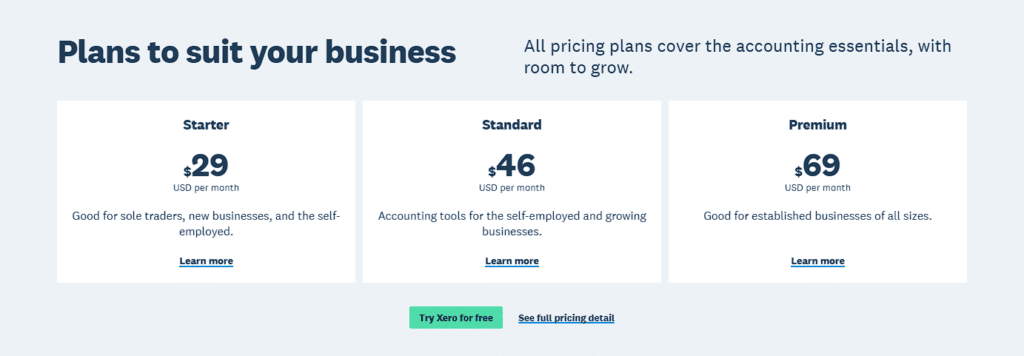
- Pricing: Slightly more affordable than QuickBooks. Xero offers three plans: Early, Growing, and Established. The Early plan is about $20/month (sometimes listed at $13–15 with promotions) and comes with limitations – e.g., you can send only 20 invoices and enter 5 bills per month. The Growing plan, around $47/month, has no invoice/bill limits and is the sweet spot for most small businesses. Established is about $80/month, adding advanced features like multi-currency support and project tracking. Xero often runs a 75% off for 6 months deal for new subscribers, which is a nice perk. Importantly, all plans allow unlimited users (QuickBooks charges for extra users on most plans), so if you want to share access with a business partner or accountant, Xero won’t make you upgrade for that.
- Ideal For: Small business owners and landlords who want robust accounting with a friendly vibe. If QuickBooks’ pricing or complexity has you hesitant, Xero is a fantastic alternative. It’s suitable for rental property accounting (many real estate investors use it) as long as you’re comfortable without rental-specific features. Xero’s strength is in being scalable and collaborative – it can handle a growing portfolio’s books and let multiple users work together. It’s also a good fit if you have an international aspect (multi-currency in higher plan) or if you simply prefer a modern UI. In short, Xero covers the accounting essentials for your rentals in a polished, slightly more affordable package than its top competitor.
Zoho Books – Affordable Full-Featured Accounting with Free Tier
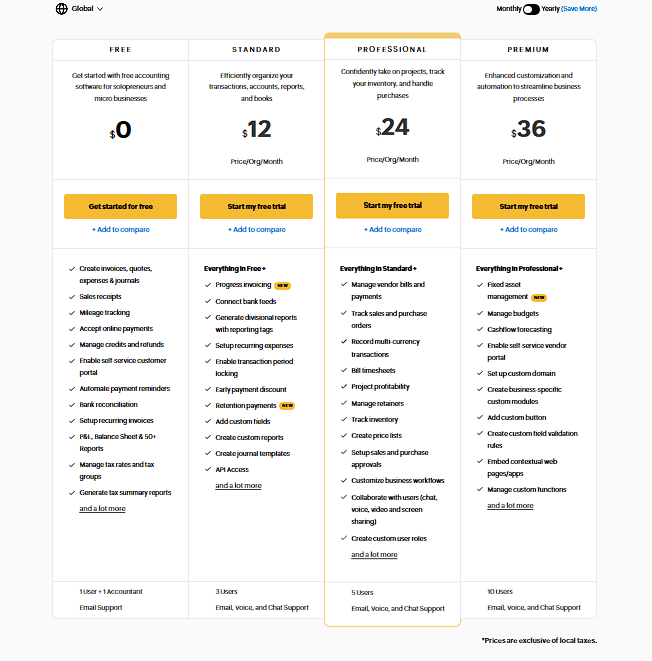
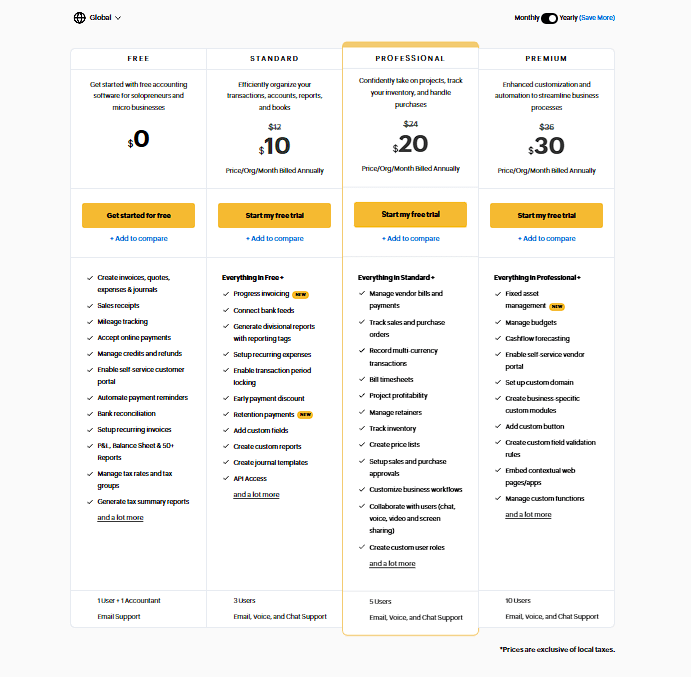
- Overview: Zoho Books is part of the larger Zoho ecosystem (which includes CRM, project management, etc.), and it shines as an affordable but feature-rich accounting software for small businesses. It handles invoices, expense tracking, bank connections, inventory management, and detailed reports – essentially all the bookkeeping tasks a landlord would need. While not built solely for rentals, you can use Zoho Books to record rent payments, categorize expenses by property, and even automate tasks like sending recurring invoices for monthly rent.
- User-Friendliness: Zoho’s interface is modern and fairly intuitive. The software includes nice touches like an audit trail (so you can see any changes made to transactions), and lots of automation options (recurring invoices, payment reminders, etc.). New users can experiment with a demo company or a 14-day free trial, and Zoho offers in-app help and a robust knowledge base. Many reviewers note that onboarding is straightforward – you can get set up in minutes, and Zoho provides live chat, email, and even phone support on paid plans (impressive at this price point!). If you’re managing finances for multiple properties, you might have to use workarounds (e.g., separate accounts or tracking categories per property), but overall it’s fully user-friendly.
Pricing: Hard to beat. Zoho Books stands out by offering a Forever Free plan for businesses with annual revenue under $50,000business.com. The free tier allows 1 user + 1 accountant and up to 1,000 invoices a year – plenty for a landlord with a few units. As your needs grow, the paid plans are very reasonably priced: Standard at $20/month, Professional at $50/month, Premium at $70/month, and two higher tiers ($150 and $275 for large or multi-entity companies). The $20 Standard plan already includes bank reconciliation, expense tracking, and up to 3 users. In fact, Zoho’s $70 Premium tier (10 users, 25k invoices/year) costs about the same as QuickBooks’ mid-tier, but it can support a much larger operation. Simply put, Zoho Books is one of the most cost-effective full accounting platforms on the market.
Ideal For: Budget-conscious landlords or property managers who need solid accounting features. If you’re just starting or have a small portfolio (and meet the <$50k revenue criteria), Zoho’s free plan is an excellent choice to handle your rental bookkeeping with zero cost. For those growing beyond that, Zoho Books’ paid plans provide great value – you get almost everything a landlord might require for accounting, at a fraction of the cost of some competitors. It’s also a great fit if you use other Zoho products, as everything integrates smoothly. The main caveat is that Zoho Books lacks rental-specific functionalities (no built-in tenant portals or lease management), so it’s best if your focus is on bookkeeping and you’re okay managing the property logistics separately. Overall, Zoho Books is casual and approachable in tone (much like this article!) and makes keeping the books for your rentals straightforward and affordable.
Wave – Free Accounting Software for Small Landlords
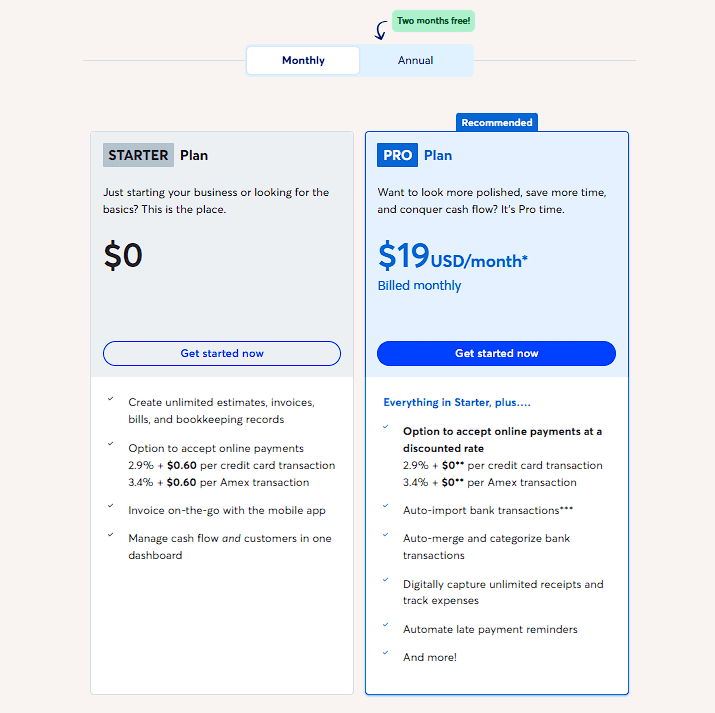
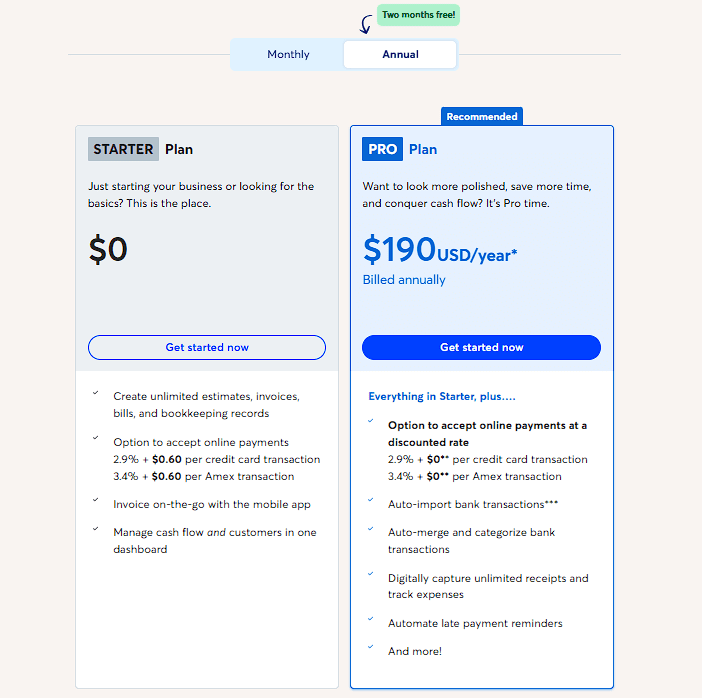
Wave’s free accounting software is perfect for landlords starting out, offering an easy way to track income and expenses without any subscription fees.
- Overview: Wave is a completely free cloud-based accounting software popular with freelancers, small businesses, and yes – many landlords. It provides all the core bookkeeping functions: you can connect your bank accounts, automatically import and categorize transactions, create and send invoices (e.g. rent receipts), track expenses, and run reports like income statements and cash flow reportsstessa.comstessa.com. Wave doesn’t include property management extras, but it’s very handy for simply keeping your financials organized. There’s also a free receipt scanning app and an invoice app, which sync with the accounting side.
- User-Friendliness: Wave is often praised for its simplicity and ease of use. If you have one or two rental properties, you can easily manage them with Wave’s clean interface – and without much accounting knowledge. In fact, landlords on forums often recommend Wave as a “simple and efficient” solution that “will do everything necessary for a single property easily.”The dashboard is straightforward, and common tasks (like categorizing an expense or viewing a report) are just a few clicks. Since it’s free, the trade-off is that you won’t get dedicated support beyond email and self-help articles. But for most basic needs, Wave is very approachable.
- Pricing: $0 – truly free. You can use Wave’s accounting and invoicing features for free, regardless of the number of properties or transactions. There are optional paid services: if you choose to accept online payments through Wave, they charge a standard processing fee (e.g. ~2.9% for credit cards, 1% for bank payments). And if you run payroll for a property management business or something, Wave Payroll is a paid add-on (starting around $20-$35 monthly in states where it’s available). But these are entirely optional – you can do all your rental bookkeeping in Wave for free and never pay a cent. This makes Wave extremely attractive for new landlords or those with tight margins.
- Ideal For: “Mom-and-pop” landlords, Airbnb hosts, or anyone with a small rental portfolio who wants to save money on bookkeeping. Wave is an excellent starter solution if you’re managing, say, a duplex or a couple of condos and just need to track income and expenses for taxes. It’s also great for separating your rental finances from personal accounts – you can have a dedicated set of books for your property at no cost. One thing to note: because Wave isn’t specialized for real estate, you might maintain each property as a separate “business” within Wave to keep reports separatestessa.com (a bit of a workaround, but doable since you can create multiple businesses under one Wave account). Also, as your portfolio grows or if you require features like tenant portals or integrated rent collection, you might eventually graduate to a paid platform. But as a starting point, Wave’s value is unbeatable. It’s user-friendly, free, and perfect for DIY landlords who just need basic bookkeeping without the bells and whistles.
Conclusion: Finding the Best Fit for Your Rental Business
Choosing the best bookkeeping software for your rental properties comes down to matching the tool with your portfolio size, feature needs, and budget. Here are a few final pointers to help you decide:
- For one-property landlords or Airbnb hosts: Starting small? You can’t go wrong with Wave for pure bookkeeping at $0 cost – it covers the basics and is very easy to use. If you want a bit more rental-specific functionality early on, TenantCloud’s Starter plan (around $18/mo) gives you rent collection and management features without breaking the bank. Both are user-friendly for newcomers.
- For growing portfolios and DIY property managers: Consider TenantCloud or DoorLoop. TenantCloud is landlord-focused and extremely cost-effective (even the Pro plan is ~$60/mo for unlimited units) while simplifying tasks like rent payments, maintenance, and tax prep. DoorLoop, while pricier, offers a slick all-in-one platform that scales well and emphasizes ease-of-use with full support, great as you acquire more units. These solutions let you handle bookkeeping and property operations together.
- For a comprehensive solution or larger operations: Buildium is a top choice if you manage a substantial number of properties or run a property management company. It’s robust, trusted, and designed to handle complex accounting per property, owner, and tenant in real-time. The trade-off is higher cost, but it can pay for itself in efficiency at scale. Larger landlords might also integrate QuickBooks or Xero for advanced accounting needs, especially if working closely with accountants.
- If you prefer general accounting software: QuickBooks Online remains the gold standard for many businesses – it’s feature-rich and widely recognized, so it’s ideal if you need formal financials or already use QuickBooks for other endeavors. Xero is a fantastic alternative, offering a friendlier interface and a lower starting price, which can be perfect for a small rental business that doesn’t require a full property management suite.
- Our Top Pick for Most Landlords: When in doubt, TenantCloud often stands out as the best fit for typical rental property owners. It’s purpose-built for rentals, combines bookkeeping with property management, and stays budget-friendly – hitting that sweet spot for user-friendliness and price. Many landlords find that TenantCloud “simplifies accounting tasks” while being “one of the more budget-friendly solutions for landlords,”igms.com, which is a hard combo to beat.
At the end of the day, the ‘best’ software is the one you’ll actually stick with. As mentioned earlier, our top recommendation is TenantCloud. All the options above can help you stay on top of your rental finances, avoid tax-time stress, and free up your time to focus on growing your rental income. Consider taking advantage of free trials (or free plans) to test a couple out. With the right tool in hand, you’ll be well on your way to mastering your rental property bookkeeping with ease and confidence!